
USB Wall Sockets vs Standard Sockets: Which Should You Choose for Your Home?
Phones, tablets, wireless headphones and other rechargeable devices have become part of everyday life. When building or renovating, it makes sense to consider where you will charge them.
Should you install USB wall sockets, keep standard sockets, or combine both?
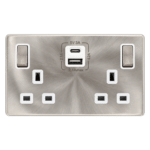
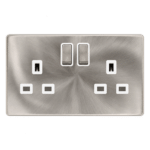
USB wall sockets offer convenient charging without a separate plug-in adapter, while standard sockets provide flexibility to use different chargers and appliances. For many homes, a combination works well: USB sockets at frequently used charging points and standard outlets elsewhere.
This guide from Keable Electrical Supply explains the differences and what to check before buying switches and sockets in Kenya.
What Is a USB Wall Socket?
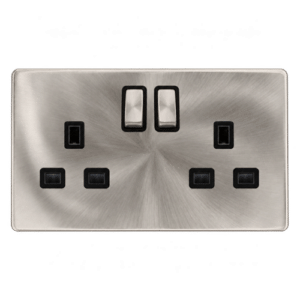
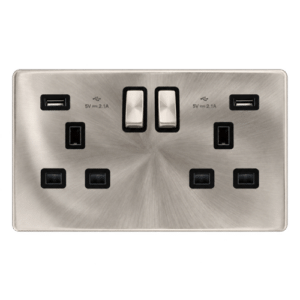
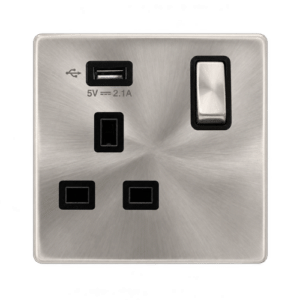
A USB wall socket incorporates USB charging ports into an electrical wall accessory. Many designs combine conventional plug outlets with USB ports on the same faceplate.
To charge a compatible device, you connect a suitable cable directly to the USB port. The charging electronics are built into the accessory.
Depending on the model, you may find:
- USB-A ports.
- USB-C ports.
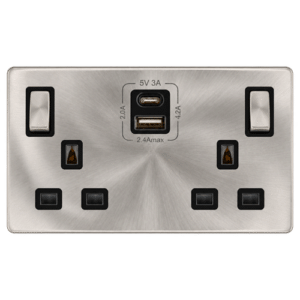
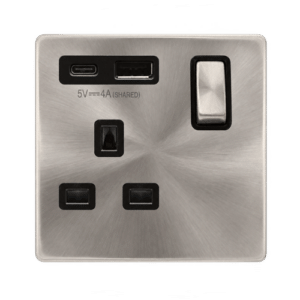
- A combination of USB-A and USB-C.
- Different charging outputs and power-sharing arrangements.
USB sockets do not all charge at the same speed. Check the specifications of the particular model before buying.
What Is a Standard Wall Socket?
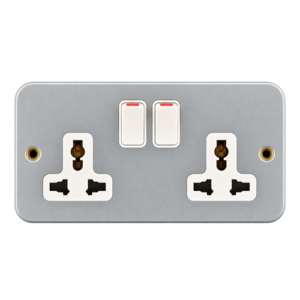
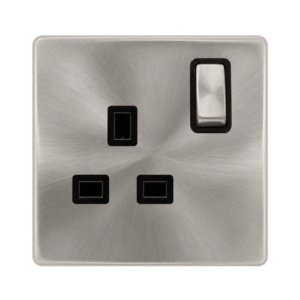
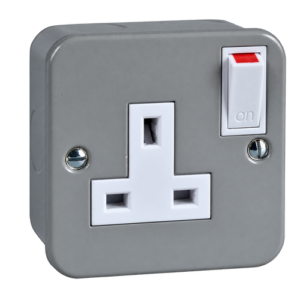
A standard wall socket provides a connection for a compatible electrical plug.
To charge a phone or tablet, you plug a suitable charging adapter into the socket, then connect your device using a cable.
The same outlet can also accommodate other suitable plug-in equipment, subject to the socket rating and circuit capacity.
Its main advantage is flexibility: you can change the charging adapter as your devices and charging requirements change.
USB Wall Sockets vs Standard Sockets: Quick Comparison
| Feature | USB wall socket | Standard wall socket |
|---|---|---|
| Direct USB charging | Available through built-in ports | Requires a plug-in adapter |
| Charging performance | Depends on the built-in charger, device and cable | Depends on the selected adapter, device and cable |
| Conventional plug connection | Available on combination models | Available |
| Upgrading charging technology | May require replacing the accessory | Usually involves changing the adapter |
| Installation considerations | Check box depth and manufacturer requirements | Check compatibility with the installation |
| Useful locations | Bedsides, desks and shared charging areas | General-purpose outlets and locations needing charger flexibility |
| Purchase decision | Compare USB specifications as well as socket features | Compare socket specifications and the charger separately |
Advantages of USB Wall Sockets
1. Convenient everyday charging
A built-in USB port gives you a dedicated place to connect a charging cable.
This can be useful beside a bed, at a desk or near a seating area where you regularly charge the same devices.
2. Fewer plug-in charging adapters
With a suitable combination socket, USB devices can charge directly while conventional plug outlets remain available for other suitable equipment.
You still need the correct cable, and the connected loads must remain within the product and circuit limits.
3. A more organised charging area
Integrated charging can reduce the number of adapters around a bedside table or workspace. Pair it with sensible socket placement and cable management for a tidier arrangement.
4. Coordinated appearance
USB socket designs may be available within decorative accessory ranges. Where matching options exist, you can coordinate them with light switches, standard sockets and data outlets.
Ask about the full range before selecting a finish.
Advantages of Standard Wall Sockets
1. Flexibility to choose your charger
You can select an adapter that matches your device’s requirements, including a suitable higher-output charger where needed.
This is useful if different family members use devices with different charging requirements.
2. Easier charging upgrades
When charging technology or your devices change, replacing a plug-in adapter is generally more straightforward than replacing a fixed electrical accessory.
3. Broad everyday use
Standard sockets serve many purposes beyond charging small electronics. Plan them around the appliances and equipment you expect to use.
4. Separate replacement of the charger
If a plug-in charger fails, it can be replaced independently. A fault in an integrated USB charger requires assessment of the wall accessory and may require its replacement.
Do USB Wall Sockets Charge Faster?
Some do, but a USB wall socket is not automatically faster than a plug-in charger.
Charging performance depends on the combination of:
- The USB port’s stated output.
- Supported charging protocols.
- Your device’s charging capabilities.
- The cable.
- Whether other ports are being used.
A suitable plug-in fast charger may outperform a basic integrated USB port. A suitably specified USB wall socket may provide the charging performance you need without a separate adapter.
Compare specifications rather than assuming one format is faster.
Check output when multiple ports are used
Some USB sockets share their available output between ports. Connecting a second device can change the power available to each one. Manufacturer documentation for combined USB-A and USB-C sockets illustrates why both individual-port and shared-output ratings matter.
Buying tip: Ask, “What output is available when both ports are in use?”
USB-A vs USB-C: What Should You Choose?
USB-A and USB-C describe connector types. They do not, on their own, tell you the charging power.
USB-A ports
These can be useful for devices and cables you already own. Check their output against the devices you intend to charge.
USB-C ports
These can be convenient for compatible phones, tablets and other devices. However, the presence of USB-C alone does not guarantee fast charging or laptop charging.
Check the stated wattage, supported charging protocols and device compatibility.
Combination USB-A and USB-C sockets
A combination can accommodate a wider selection of existing cables. Confirm whether the ports share output and whether their performance meets your needs.
Can a USB Wall Socket Charge a Laptop?
Only if its USB output, charging protocol and cable are compatible with the laptop’s requirements.
Some integrated ports are intended primarily for lower-power devices. Do not assume that a socket can charge a laptop because it has a USB-C connection.
For a home office, compare the socket’s specifications with your laptop manufacturer’s requirements. A standard outlet with the laptop’s recommended charger may be the more practical choice.
Where Should You Install USB Sockets?
Bedrooms
Bedside USB sockets can be convenient for charging phones and other compatible devices overnight.
Plan around the actual bed and bedside-table positions so outlets remain accessible.
Living rooms
Consider charging points near seating areas or a dedicated charging shelf.
Keep enough conventional outlets for lamps, entertainment equipment and other planned uses.
Home offices
USB ports can serve phones, headphones and suitable accessories. Retain standard outlets for computers, monitors, printers and equipment needing separate power supplies.
Guest rooms
Integrated charging can offer convenience, but guests may need different outputs or cables. Keep accessible standard sockets available too.
Kitchens
A charging point may be useful, but its position must account for water, heat and food preparation. Have your electrician select a suitable location.
Should You Replace Every Socket with a USB Socket?
Usually, there is little practical benefit in adding USB charging where it will rarely be used.
A more targeted approach is to:
- Identify where devices are charged most often.
- Check the charging requirements of those devices.
- Install suitable USB sockets at selected points.
- Keep standard sockets for general use and charger flexibility.
For example, a bedroom might benefit from bedside USB charging while retaining standard outlets near a desk or television.
What Should You Check Before Buying?
Charging specifications
Confirm connector types, output per port, supported protocols and performance with multiple devices connected.
Installation compatibility
USB charging electronics can affect the space required behind the faceplate. Ask your electrician to check the manufacturer’s minimum back-box depth and available wiring space.
Conventional socket rating
On a combination accessory, check the mains socket specifications separately from the USB output.
Switching behaviour
Do not assume that the switches controlling the plug outlets also disconnect the USB charger. Check the manufacturer’s instructions for the specific product.
Quality and product support
Look for clear manufacturer information, technical documentation, relevant conformity information and warranty terms.
Matching finishes
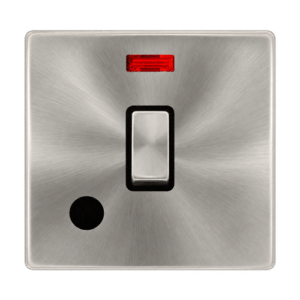
Confirm that your preferred USB socket coordinates with the other accessories in the room. Ask about available white, black, black and gold, brushed steel or other finishes.
What Affects USB Socket Prices in Kenya?
Prices vary according to the product range, finish, port configuration and charging features.
When comparing quotations, check that you are comparing equivalent products. A basic USB-A outlet and a higher-output USB-C charging accessory may offer different capabilities.
Also consider any installation changes your electrician identifies.
Contact Keable Electrical Supply on 0718 821018 for current prices and availability. Share the quantity, preferred finish and devices you intend to charge.
Frequently Asked Questions
Can I use the USB ports and plug outlets together?
Many combination models are designed for simultaneous use, subject to their specifications and the installation’s limits. Confirm the manufacturer’s instructions.
Will a USB socket reduce my electricity bill?
Do not choose one on that assumption. Energy consumption depends on charging efficiency, standby consumption and usage. Its main appeal is convenience.
Do USB wall sockets transfer data?
Charging ports on these accessories are generally intended to supply power. Do not assume they provide networking or data transfer unless the product explicitly includes that function.
Can I replace a standard socket with a USB socket?
Often this is possible, but an electrician should check the wiring, mounting arrangement, box depth and product requirements first.
Does a USB socket provide surge protection?
Not automatically. USB charging and surge protection are separate features. Check the specifications rather than assuming protection is included.
Which is better for my home?
Choose USB sockets where integrated charging offers a clear benefit. Choose standard sockets where flexibility matters. A planned combination can meet both needs.
Find Suitable Sockets at Keable Electrical Supply
The right choice depends on what you charge, where you charge it and how much flexibility you need.
Before ordering, prepare a room-by-room socket list and have your electrician confirm installation requirements. Then compare charging specifications, finishes and current prices.
Building, renovating or upgrading your charging points? Contact Keable Electrical Supply to enquire about USB wall sockets, standard sockets and matching electrical accessories.
Call or WhatsApp: 0718 821018
Send your quantities, preferred finish and charging requirements for a quotation.




Add comment